 Christopher Dellen
How to Use HubSpot Prospecting Agent to Get More Out of Your Sales Team
 Christopher Dellen : (June 18, 2026)
What Is HubSpot Prospecting Agent?




|
Manufacturing CompaniesConnecting churches with communities through inspired marketing |

|
ChurchesDriving growth, one product at a time – marketing solutions for manufacturers |
Are your HubSpot forms quietly killing your leads? Research shows that 81% of people have abandoned a web form after starting to fill it out, and if you're still running the old HubSpot legacy forms, you're probably feeding that number. This post is for HubSpot users, marketing teams, and service business owners who are ready to stop leaving better data and better experiences on the table. The new HubSpot forms tool, especially when you put HubSpot dynamic forms with conditional logic to work, is one of the most underused features on the platform. We're going to fix that today.
If you've been using HubSpot for a while, you know the legacy forms editor. It's familiar. It works. Kind of.
The problem is that legacy forms are static. They stack every question on a single page and show every visitor the same fields, whether those fields apply to them or not. That's how you end up with long, scrolling forms that feel like a tax return.
The core issue: legacy forms don't adapt. Someone interested in your consulting services shouldn't have to scroll past questions designed for product buyers. But with a legacy form, they do. Every time.
Form length is one of the top reasons people abandon online forms, cited by 27% of users. And here's the problem nobody wants to talk about: even when people do push through and submit a long legacy form, the data you collect is messier. Irrelevant fields get skipped or guessed at. Your sales team inherits that noise and spends time chasing it down.
Legacy forms also don't give you true multi-step experiences. You're stuck trying to guide someone through a form that just sits there. No progression. No intelligence. Just a wall of fields.
Practical Takeaway: If your form asks more than four or five questions and every visitor sees the same ones, you're overdue for an upgrade.

HubSpot's new forms tool replaces static, single-page layouts with something far more powerful: adaptive, logic-driven form experiences. Instead of showing every field to every person, the form responds to how someone answers earlier questions.
That's the engine behind HubSpot dynamic forms with conditional logic.
Here's how it works in plain terms. You build your form in steps. Each step is its own window in the form editor. Then you set up logic rules that tell the form: if someone chooses X in step one, take them to step three. If they choose Y, take them to step four. The form essentially builds a custom path for each visitor based on what they've already told you.
The new editor gives you far more control over how your forms look and feel, too. Spacing, colors, layout, and overall presentation are all fully customizable to match your brand. And if you prefer to embed forms on a page, they still embed the same way the old ones did. Same flexibility, dramatically better experience.
Breaking a longer form into smaller, more digestible steps can dramatically increase completion rates by mitigating the initial overwhelm a visitor might feel when confronted with a long list of fields.
Want to see this come to life? Here's a fun example that shows exactly how conditional logic changes the form experience.
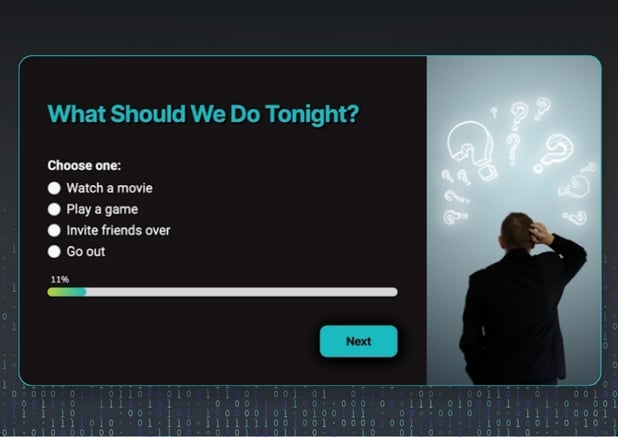
Imagine you build a form with one opening question: What should we do tonight? The options are: Watch a movie, Play a game, Invite friends over, or Go out.
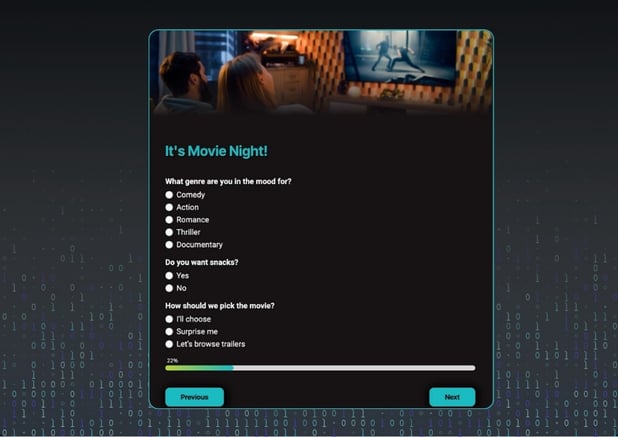 Pick "Watch a movie" and the form instantly shifts to movie-specific questions. What genre? Do you want snacks? How should we pick it? No restaurant questions. No game questions. Just the path that fits the answer.
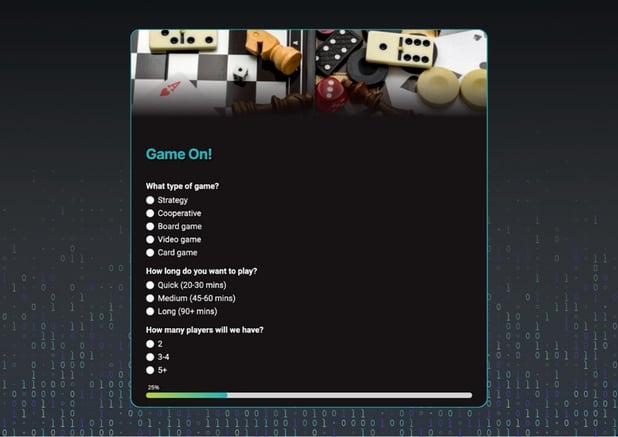 Pick "Play a game" instead, and the form takes a completely different route. How many players? What kind of game? Each choice creates a distinct experience because the logic rules skip irrelevant steps and surface only what matters.
That's not just a slick demo trick. Teams using this approach for event registrations, service intake forms, and lead capture have seen it make a real difference in narrowing down visitor personas and routing people through question paths that are specific to them.
Practical Takeaway: Before you build, map out your form flow on paper. Decide which questions depend on earlier answers, and group them into steps. A five-minute outline up front makes the build faster, cleaner, and far less frustrating.
Yes, and here's why the answer is that simple.
The legacy editor is on its way out. HubSpot has officially started rolling out its new Forms editor across all accounts, with new forms now using the updated editor by default. Sticking with legacy forms right now means you're managing infrastructure heading toward sunset, and every month you wait is another month of underperforming data.
But this isn't just about platform timing. It's about what better forms actually do for your business.
Here's what changes when you make the switch:
Direct benefits you'll feel almost immediately include shorter-feeling forms, higher completion rates, more relevant submissions, and a more modern, polished experience for your visitors.
The indirect benefits compound over time. Better lead routing, more reliable automation, less cleanup work, and faster sales follow-up. When your form only asks relevant questions, sales receives cleaner, more actionable information. No more "what did they mean by this field?" conversations.
HubSpot's conditional logic allows you to show or hide specific questions based on a visitor's previous answers, making the form feel more intuitive and leading to better data collection and higher engagement rates, as users are only asked questions that matter to them.
And there's an emotional layer here worth naming. Visitors feel respected when a form doesn't waste their time. That experience reflects on your brand before a single conversation happens.

When teams delay making this shift, things don't just stay the same. Forms keep underperforming, drop-offs continue, and messy data compounds. The longer legacy forms stay live, the more cleanup work you're creating for later.
Practical Takeaway: Pick one form to improve. A contact form, a lead capture form, a service intake. You don't need to rebuild everything at once. Just experience the difference that logic and better design can make.
Here's a practical walkthrough of the build process.
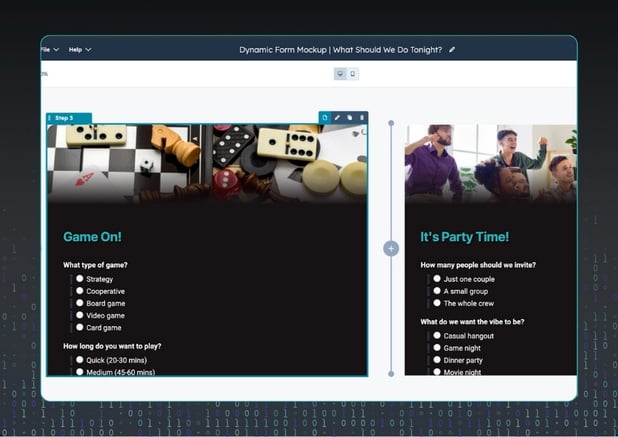 Step 1: Open the new forms tool and start a new form. Each "window" in the editor is a step. Step one, step two, step three, and so on. You can see all of them laid out as you build.
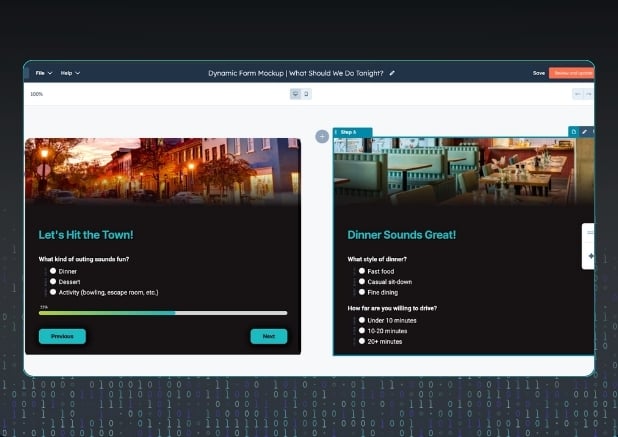 Step 2: Build your steps first, then layer in the logic. Add your questions to each step before you start connecting them. It's easier to see the full picture first.
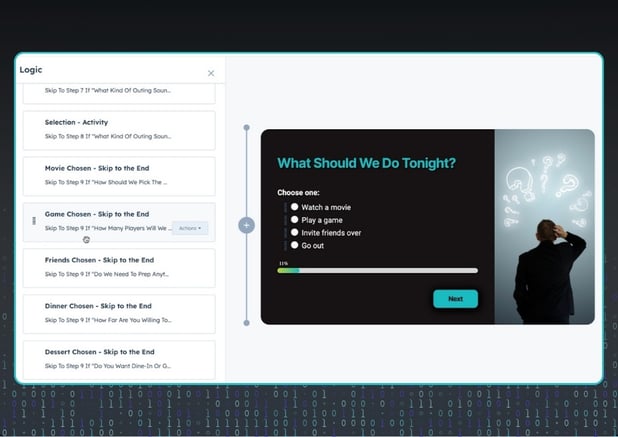 Step 3: Navigate to the Logic section. This is where all the rules live. You'll see every rule powering the form experience laid out in one place.
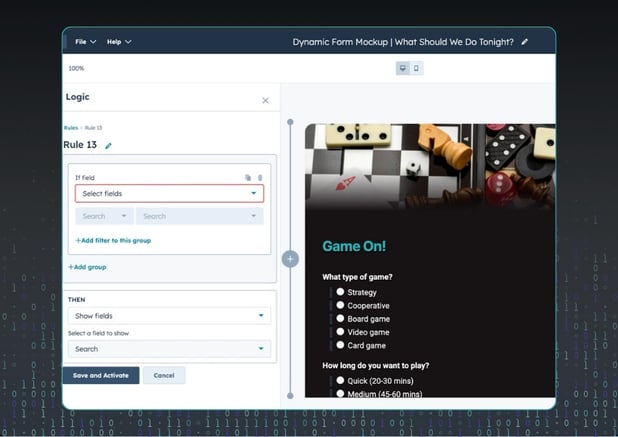 Step 4: Create your rules. Each rule follows a simple structure: if someone answers a specific way in step one, send them to step three, skipping step two entirely. You can build as many rules as you need.
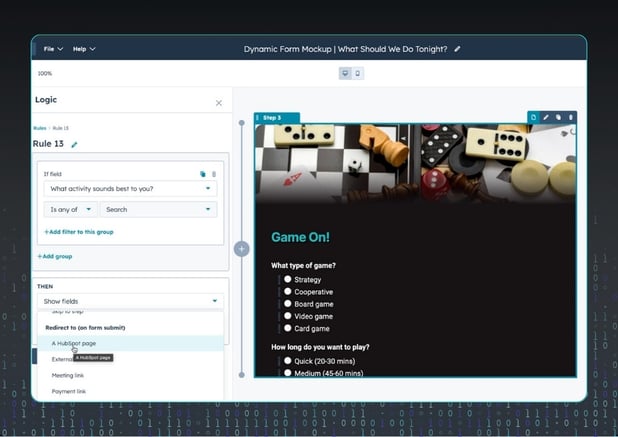 Step 5: Test every path. Run through each possible answer combination to make sure the logic routes correctly. One wrong rule can send someone to the wrong step, so this is worth your time.
Beyond skipping steps, the logic can also show or hide individual fields within a step, redirect visitors to different pages or URLs based on their answers, and even send them to a payment link depending on what they've selected. The form becomes a decision engine, not just a data collector.

Teams that have put logic-based HubSpot dynamic forms to work consistently see four outcomes: higher completion rates, fewer abandoned submissions, cleaner and more usable data, and less manual follow-up from sales or support.
Why? Because people are far more likely to finish a form when it feels shorter, looks better, and only asks questions that apply specifically to them. Improving checkout and form design can reduce form abandonment by as much as 35%.
The data quality improvement is where service business owners tend to feel the biggest relief. When your intake form routes a prospect through questions tailored to their situation, what lands in your CRM is precise and usable. Your team stops guessing at what a half-completed field means and starts acting on information that actually tells the story.
The gap between a static form and a smart, dynamic form is bigger than most teams expect. And once you build your first logic-powered form, the old way of doing it will feel impossible to go back to.
Do the new HubSpot forms still embed on external pages? Yes. The new forms embed exactly like the legacy forms did. Same flexibility, same process, but a much better experience for visitors.
Do I need a developer to set up conditional logic? No. The new forms editor is built for marketers. The logic interface is visual and straightforward. You select the step, set the condition, and define the destination. No code required.
What happens to my existing legacy forms? Your legacy forms will continue to work for now. HubSpot hasn't announced a hard sunset date, but the legacy editor is no longer the default. It's a good idea to start migrating forms over gradually rather than all at once.
Where should I start if I want to switch? Start with one form that either has high traffic, high abandonment, or one that feels like it's collecting messier data than it should. Build the new version, test it, and see the difference before you touch anything else.
Can I redirect visitors to different pages based on their answers? Yes. The logic can redirect to a HubSpot page, an external URL, or even a payment link depending on how someone answers your questions. This is especially useful for routing different types of buyers or service tiers to the right next step.

Legacy HubSpot forms are friction disguised as "just how forms work." The new HubSpot dynamic forms tool, paired with conditional logic, gives you everything you need to build experiences that adapt, convert, and collect data you can actually use.
Stop showing everyone the same questions. Start building forms that feel like they were built for the person filling them out, not just the system behind them.
The shift is smaller than you might think. Start with one form. Map your flow. Build your logic. The results will do the convincing.


Christopher Dellen : (June 18, 2026)
What Is HubSpot Prospecting Agent?
Christopher Dellen : (March 26, 2026)
HubSpot is Home. Why Is Your Team Working Somewhere Else? What Is the HubSpot Projects Object? HubSpot Projects is not an experiment or a side tool...

Christopher Dellen : (May 21, 2026)
{% video_player "embed_player" overrideable=False, type='hsvideo2', hide_playlist=True, viral_sharing=False, embed_button=False, autoplay=False,...